PHILIPPINES / REMOTE
KOLEEN CORMERO / PORTFOLIO 2026
CASE STUDY / BUILT & TESTED IN A SANDBOX
One opportunity.
A linked task.
Less repeat entry.
I connected HighLevel opportunities to ClickUp tasks so the team can enter an estimating request once, create its task after approval, and track progress on the correct project.
THE WORKING PROBLEM
Reduce repeated entry.
Keep each project connected.
Recording an estimating request in GHL and then recreating it in ClickUp means repeated manual input, task setup, and link copying. Progress also has to be checked and transferred between the two systems. When one customer has multiple projects, matching by contact alone can select the wrong request.
MY CONTRIBUTION
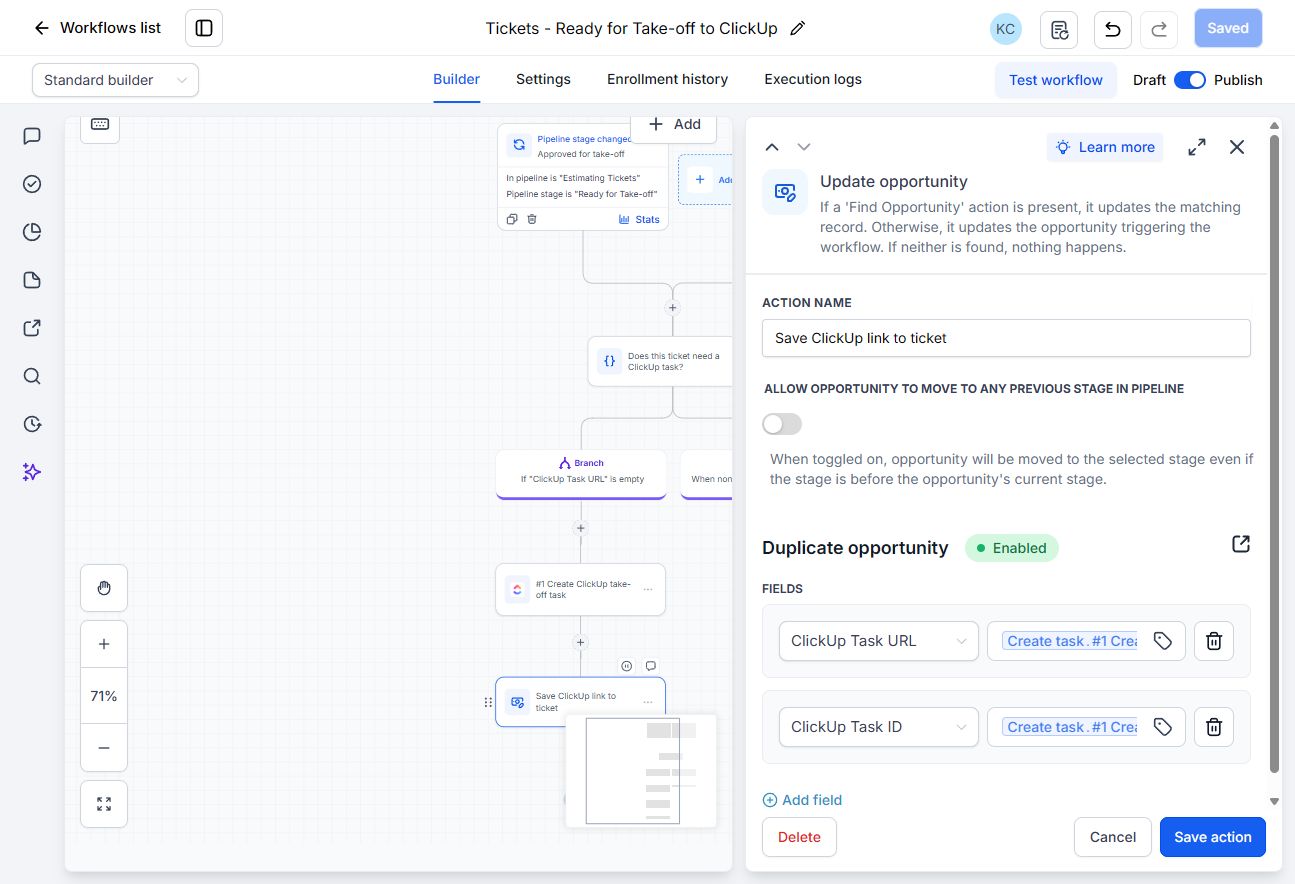
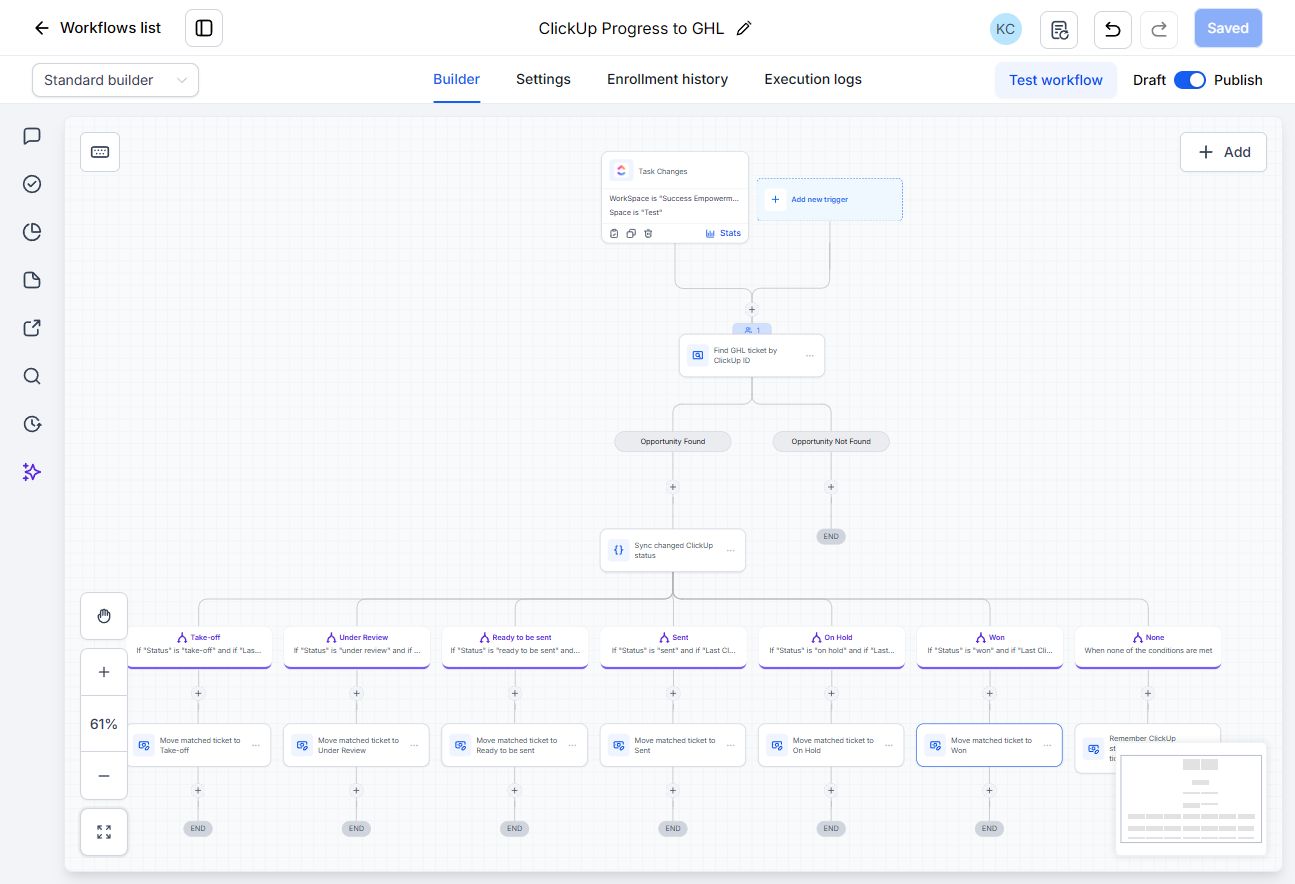
I configured the estimating pipeline, the Ready for Take-off trigger, the existing-task check, and ClickUp task creation. The workflow saves the returned task ID and link on the originating opportunity. A second workflow uses that ID to update the right opportunity when the task status changes.
- Match the stored ClickUp Task ID
- Compare incoming and remembered statuses
- Allow genuine revisions to earlier stages
01 / PIPELINE SETUP & OPPORTUNITY-TO-TASK CREATION
From an approved opportunity.
To a linked ClickUp ticket.
I configured an Estimating Tickets pipeline and a workflow for opportunities that reach Ready for Take-off. Approval stays with the team; the workflow handles the repeated handover into ClickUp.
Use the pipeline stage
An opportunity enters Ready for Take-off. The workflow checks the saved ClickUp Task URL before choosing the creation path.
Create the linked task
If the URL is empty, create the ClickUp take-off task from the opportunity context. An existing link skips task creation.
Save the identifiers
Write the returned task ID and URL back to that GHL opportunity. Later updates use the stored task ID to find the correct ticket.
THE PRACTICAL CHANGE / LESS REPEATED MANUAL INPUT
Enter the request once.
Reduce the repeated handover.
Task setup
Before: recreate the estimating request in ClickUp after recording it in GHL.
After: the approved opportunity triggers task creation, reducing repeated setup and entry.
Record linking
Before: copy the task link back to the CRM and keep track of which project it belongs to.
After: the workflow saves the task ID and URL on the originating opportunity.
Progress tracking
Before: check ClickUp and manually update the corresponding CRM stage.
After: mapped status changes update the matched opportunity, while unchanged-status events are skipped.
The sandbox build demonstrates fewer manual handover steps and less repeated entry. It also keeps separate projects from the same customer linked to their own tasks.
TRY THE HANDOVER / FICTIONAL OPPORTUNITIES
Move the opportunity.
Inspect the task-creation path.
Try an unapproved request, approve a new project, or repeat an already-linked opportunity. Compare two projects from the same builder.
Approve once.
Carry the context forward.
The pipeline is already configured. Select an opportunity and simulate a stage event to see when the task-creation path runs.
This browser simulation illustrates the saved workflow logic. Task identifiers and URLs are fictional. It does not create live opportunities or tasks.
THE ACTUAL BUILD / TASK CREATION & LINK STORAGE
The trigger, the check,
and the saved task link.
02 / STATUS UPDATES BACK TO GHL
01
Receive the task update
Receive a ClickUp task update containing its task ID and current status.
02
Match & compare
Find the ticket by task ID and compare the new status with the remembered one.
03
Update or skip
Apply a mapped transition, or leave the stage unchanged when no status change occurred.
TRY THE LOGIC / FICTIONAL TICKETS
Change the work.
Follow the right record.
Try a status change, description edit, revision, or unknown task ID. The walkthrough simulates the decision rules without connecting to live accounts.
Change the work.
Follow the right record.
THE ACTUAL BUILD
Six mappings.
One matched ticket.
TESTED BEHAVIOUR
Check status changes
and common exceptions.
- Six statuses mapped in the sandbox
- Revisions between Take-off and Under Review tested
- Description edits leave the stage unchanged
- Updates keep unrelated projects unchanged
PROJECT SCOPE
Built and tested in a sandbox. The workflow creates and links an estimating task, then updates the matched GHL opportunity from mapped ClickUp status changes. The team enters and approves the original request.
The saved task-link check avoids recreating an already-linked task during the normal workflow. This project covers task creation and status updates; it does not synchronise every field between the two systems.
LET’S MAKE THE NEXT STEP CLEAR
Have a role
in mind?
Tell me about your team, the work involved, and where I can contribute.
cormerokoleen25@gmail.com
Based in the Philippines. Experience supporting Australian and U.S. teams remotely.